01Orientation
Selling Platform Connect (SPC) is the browser front door to the Amadeus GDS. There is no sandbox here: everything you click is live, in the office LONU125SX, on Simplexity Travel's own credentials. Treat the screen the way you would treat a live production database, because that is exactly what it is.
SPC gives you two working styles layered over the same underlying system.
Graphical mode is the menus-and-forms layer: search boxes, results grids, buttons labelled Sell, Book, End. This is the mode you should use for everything in this guide. It is slower than the alternative but far harder to fire by accident.
Cryptic mode (also called the command page) is the terminal underneath, where trained agents type short codes such as HS1 or ER directly. You do not need to type cryptic commands yet. You do need to recognise them, because Simplexity's screenshots, training notes and the command line at the bottom of the SPC window will show you cryptic output whether you asked for it or not. Section 4 below is your glossary for that.
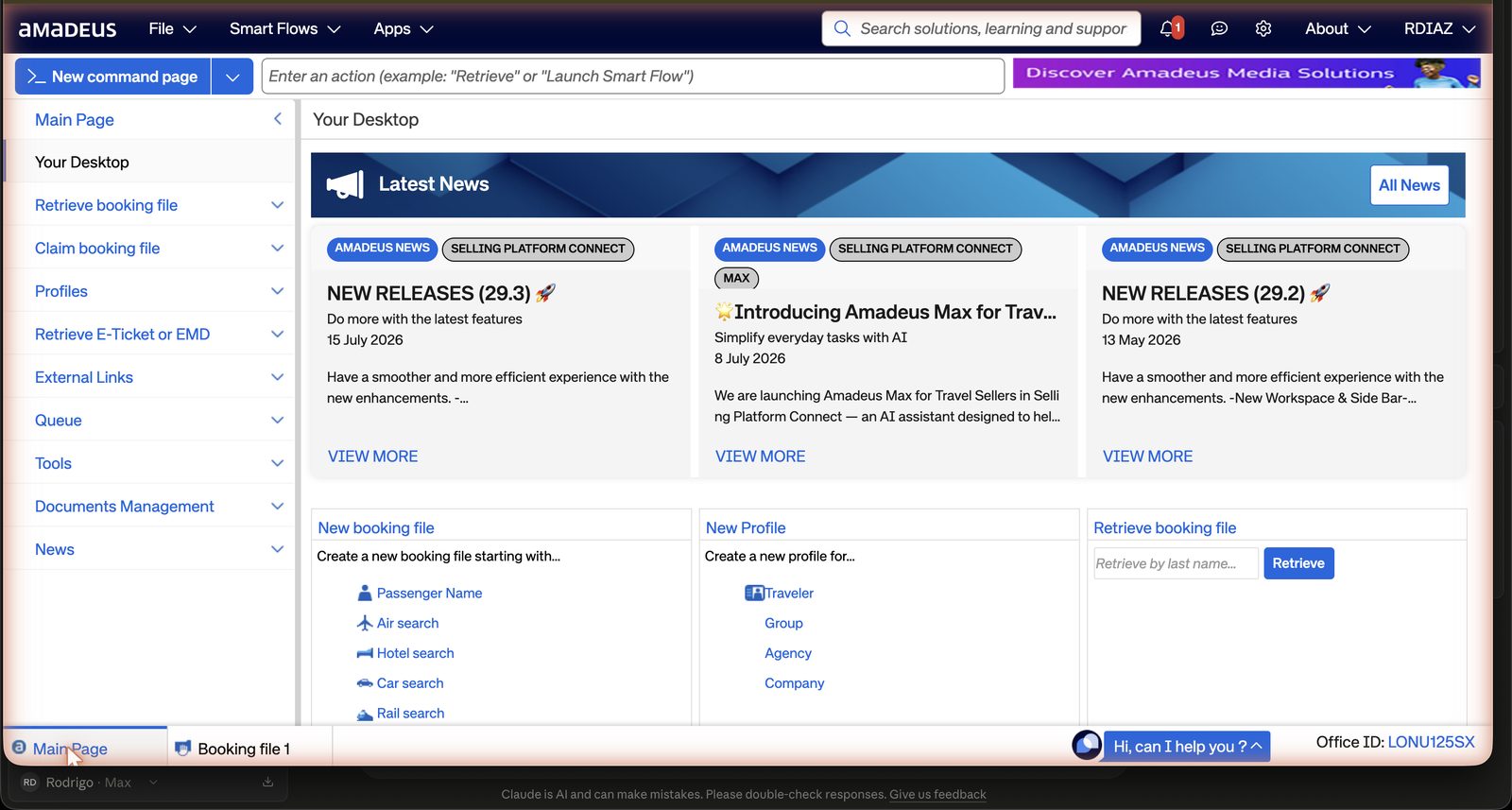
Where things live in the graphical shell: a top navigation bar carries the main menus and a + / New control for starting a fresh working file. A personal work area holds queues and files assigned to you. A search magnifier, usually top right, is how you look up an existing PNR (booking file) or a client profile by name or record locator. You will also see an Amadeus Max AI assistant and a "Hi, can I help you?" helper prompt sitting on the page. Both are worth knowing exist, but this guide does not depend on either of them. may sit under a slightly different name in your office profile
 1
2
3
4
5
1
2
3
4
5
02Golden safety rules
Read this before you touch anything else
- Looking is free. Availability displays and pricing displays cost nothing and change nothing. They are how you browse. The system only becomes dangerous the moment you click Book on a rate, or click the Save (ER) button on a booking file. Everything before those two clicks is reversible.
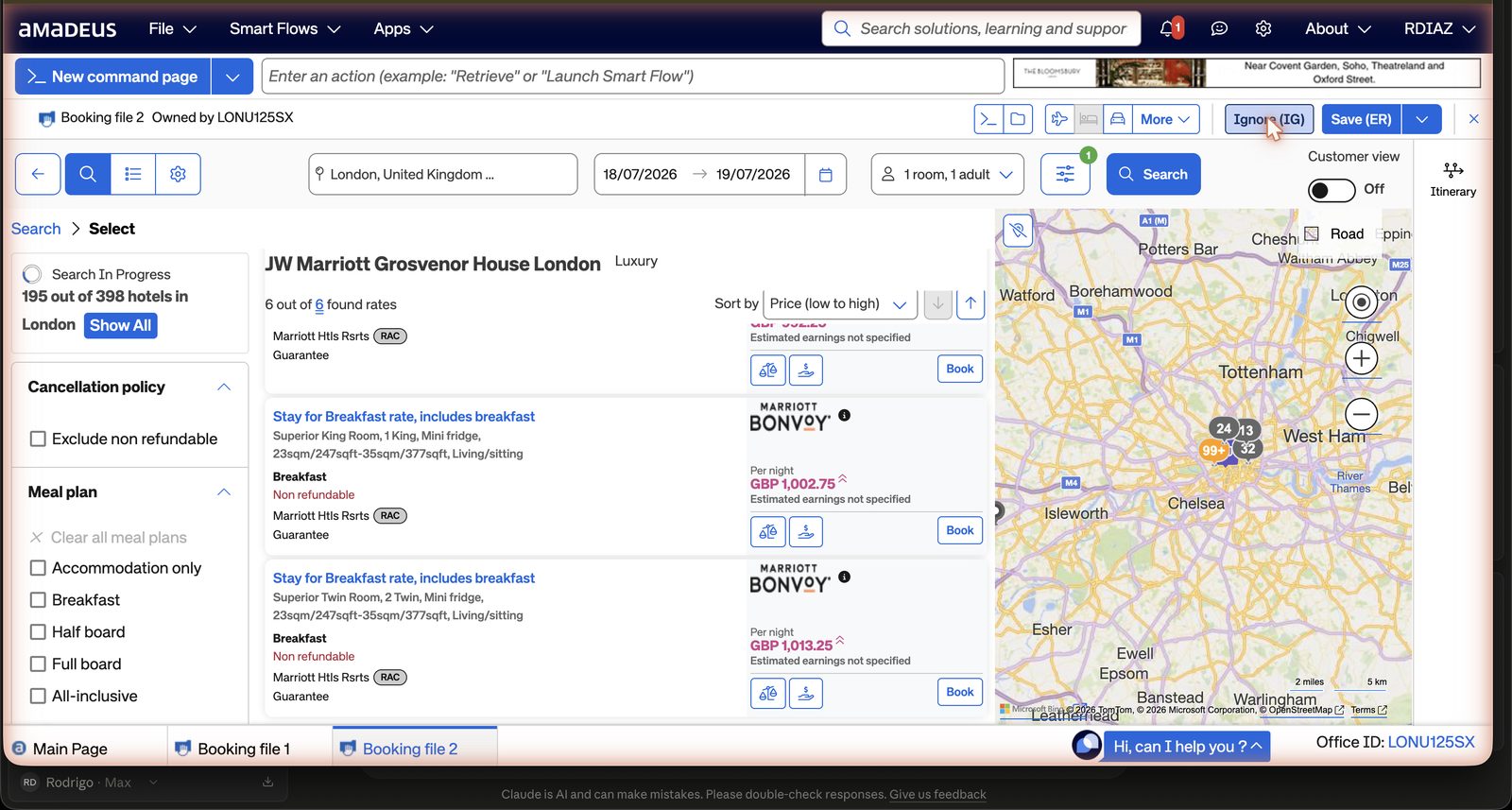
- Know your escape hatch first. The booking-file top bar carries two buttons, literally labelled Ignore (IG) and Save (ER). Ignore abandons the working PNR without saving anything, no matter how far you got. Find this button before you attempt a real sell. It is your undo, shown below.
- Card numbers never go into SPC free text. Never in a remark, a note, an email or the hub. The card ladder has three rungs. Preference: no card at all, the hotel charges the guest directly at the property. When a rate requires a guarantee or deposit: the member's card lives in TravelJoy, the club's PCI-compliant vault; you open it there, type it into the guarantee field of the booking flow for that one booking, and close the vault. Prepaid and non-refundable rates: same vault, same field, but the card is charged at the moment you sell, so confirm the member has accepted the cancellation line in writing before you press anything. TravelJoy is the only place a card is stored; SPC's guarantee field is the only place it is typed; nowhere else, ever.
- Flights are out of bounds. Never touch ticketing (TTP) or EMD (electronic miscellaneous document) actions. This guide, and your remit, is hotels only for now.
- Cancellation deadlines live in the rate rules, not in your memory. Read the policy line before you sell anything, and screenshot it straight into the client file. If a member later needs to cancel, that screenshot is the only proof of the deadline you agreed to.
 1
1
03The hotel workflow, graphical mode, step by step
This is the sequence for a standard hotel booking, start to finish. Work through it in order; do not skip to selling before the file has a proper shell.
- Start a booking file. Use New file / New PNR from the top navigation. A hotel sell still needs a proper PNR shell underneath it, so before you can end the file you will need a traveller name element (NM), a contact element (AP), a ticketing time limit that the system sets automatically (TK OK), and a received-from element (RF) recording who requested the booking.
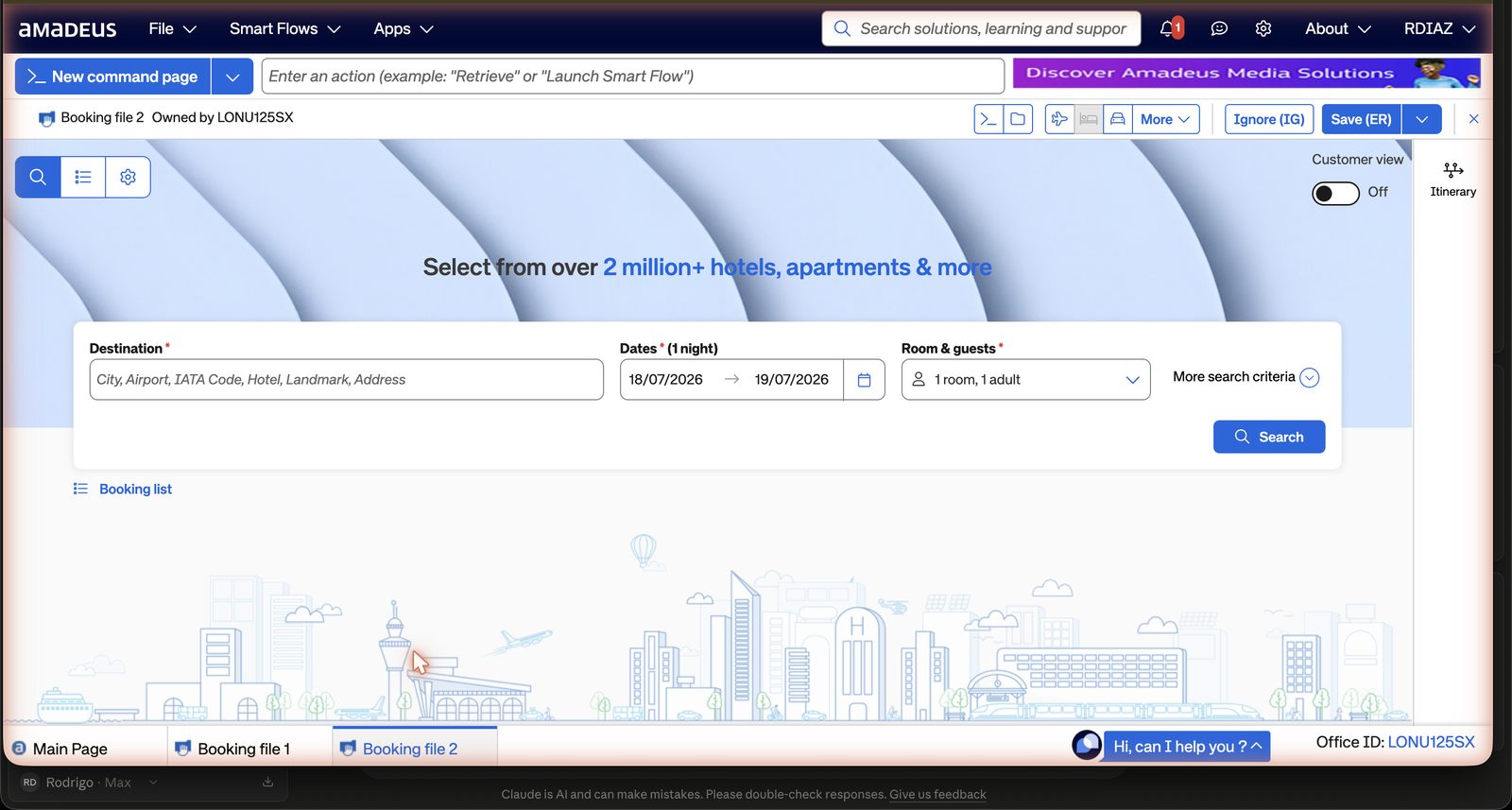
- Open the Hotels search. This sits under Book > Hotel, or a dedicated Hotels tab, depending on your profile. Enter the destination city or hotel name, check-in and check-out dates, and the number of rooms and guests. Crucially, look for the Rate codes or Special rate codes box under More search criteria. It accepts up to eight codes at once, and this is where you load the club's negotiated SR- access codes. may sit under a slightly different name in your office profile
 1
2
3
4
5
6
1
2
3
4
5
6
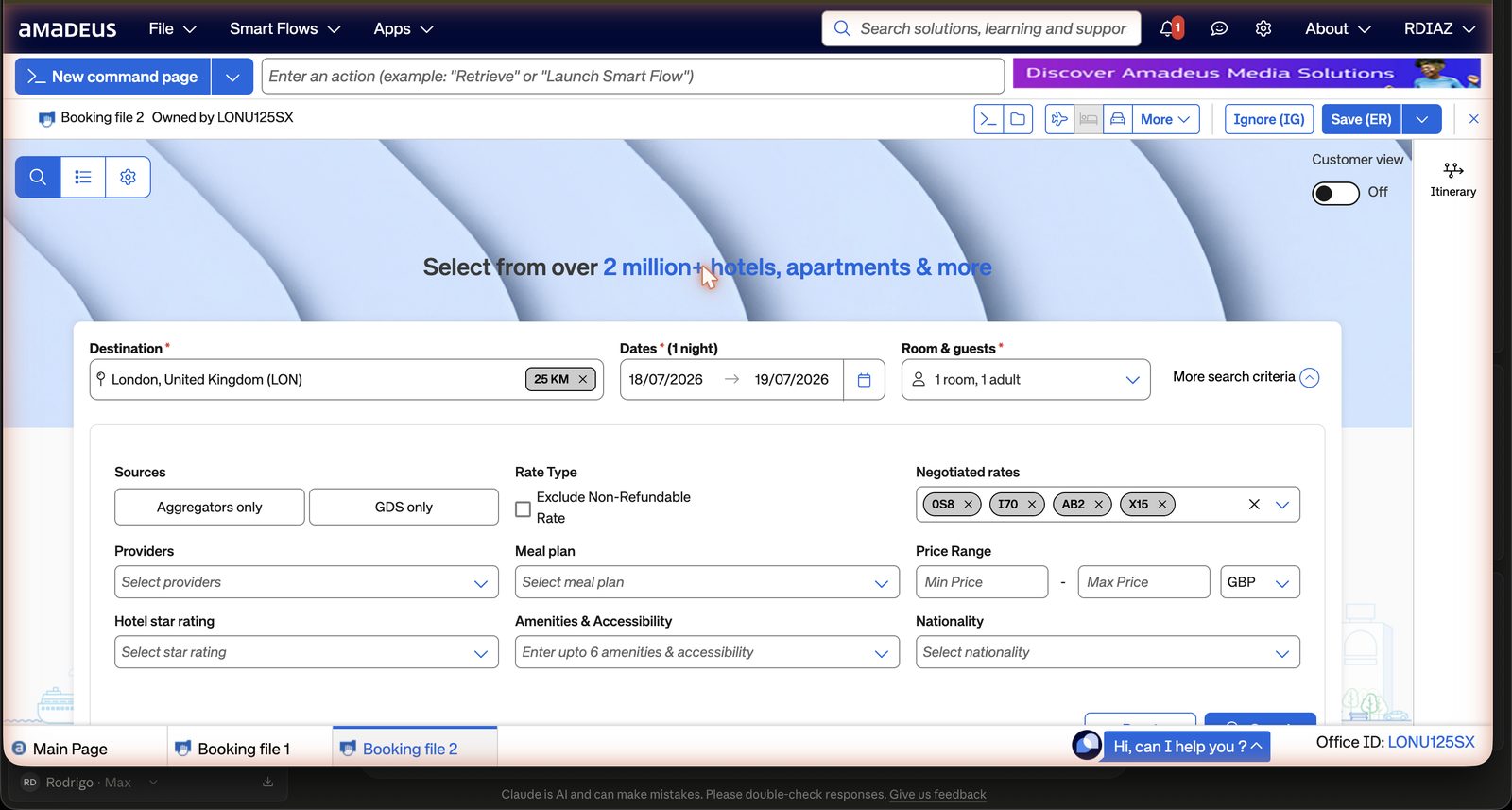
1 Destination: city, hotel name, even a landmark · 2 Dates, defaults to tonight, always set your real dates · 3 Rooms and guests · 4 More search criteria, open this every time, the codes live here · 5 Customer view toggle: hides trade info when a member is watching your screen · 6 Ignore (IG) and Save (ER), the only two buttons that end a file: abandon or commit. - Load the negotiated codes. Opening More search criteria reveals the rate codes box together with the source and filter controls that shape what comes back.
 1
2
3
4
1
2
3
4
1 Negotiated rates: the club's codes loaded as chips, 0S8 I70 AB2 X15, up to eight · 2 Sources: Aggregators only / GDS only, leave both for the widest net · 3 Exclude non-refundable, tick when a member wants flexibility only · 4 Meal plan and price filters, breakfast filter beats reading every rate. - Choose which codes to enter. These come from Simplexity's own negotiated programme sheet, not from anything generic in Amadeus. The table below is the club's working reference.
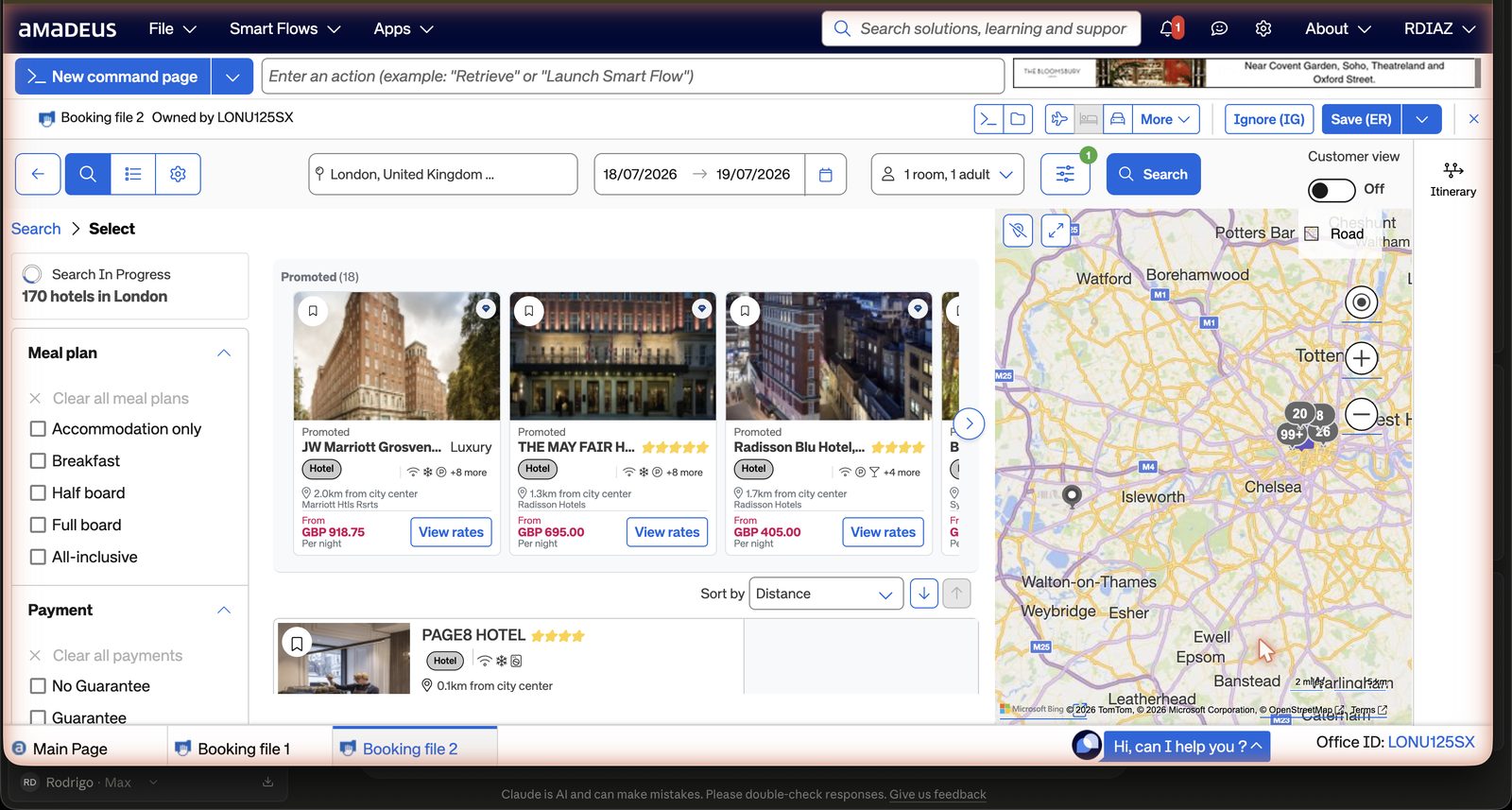
The club's rate codes, from Simplexity's sheet Programme Code What it carries Marriott STARS 0S8 Breakfast for two, wifi, upgrades where offered. Luxury Marriott brands: Ritz-Carlton, St. Regis, EDITION, Luxury Collection, W. Marriott Luminous L72 Breakfast for two, early/late check where offered. Premium Marriott brands. Hilton For Luxury (ex Impresario) I70 Breakfast, upgrade on arrival where available. Waldorf Astoria, Conrad, LXR. Hyatt Prive 1HZ 10% commission, breakfast for two, upgrades. Park Hyatt, Alila, Andaz. IHG Luxury & Lifestyle Destined LXO Benefits at Six Senses, Regent, InterContinental, Kimpton. Jumeirah Passport to Luxury JPL Breakfast, upgrades where offered. Accor STEP HERA 1TW (rate name STP) Breakfast for two, 50 or 100 USD credit. Raffles, Fairmont, Sofitel Legend. Design Hotels Collective DJC Breakfast for two. Small Luxury Hotels W9E (rate name SLS) Best available rate, 10% commission. Advantage for Virtuoso AB2 Breakfast for two, 25 USD F&B credit. The Virtuoso-flavoured net until the club's own Virtuoso membership lands. Advantage Hotel Program WYN Primary code, 8% commission, best flexibility. Advantage Hotel Program WYZ 10% commission, 10% off best available rate. Simplexity corporate umbrella X15 The house code. Carries dozens of one-property corporate deals: several London Hiltons, Edwardian, Park Grand and Montcalm, Novotel London West, Kolbe Rome, Sofitel Heathrow and more. Everyday fallback ABC Discounted best available rate. Everyday fallback AOM ABC Premier Privileges. Practical recipe. For a luxury request, load the chain programme code for that brand family, plus AB2, plus X15. For a mainstream city hotel with no obvious luxury programme, load WYN, plus X15, plus ABC. That combination in the eight-code box gives the widest honest read of what the club can access without you having to guess in advance which one will actually return space. - Read the results screen before opening anything. Hotels stream in as the sources answer, each card carrying a star rating, distance from the search point, and a lead price. The map alongside mirrors the list, and either can be sorted by distance or price. Nothing here is a rate yet, it is just the field of hotels worth a closer look.
 1
2
3
4
5
1
2
3
4
5
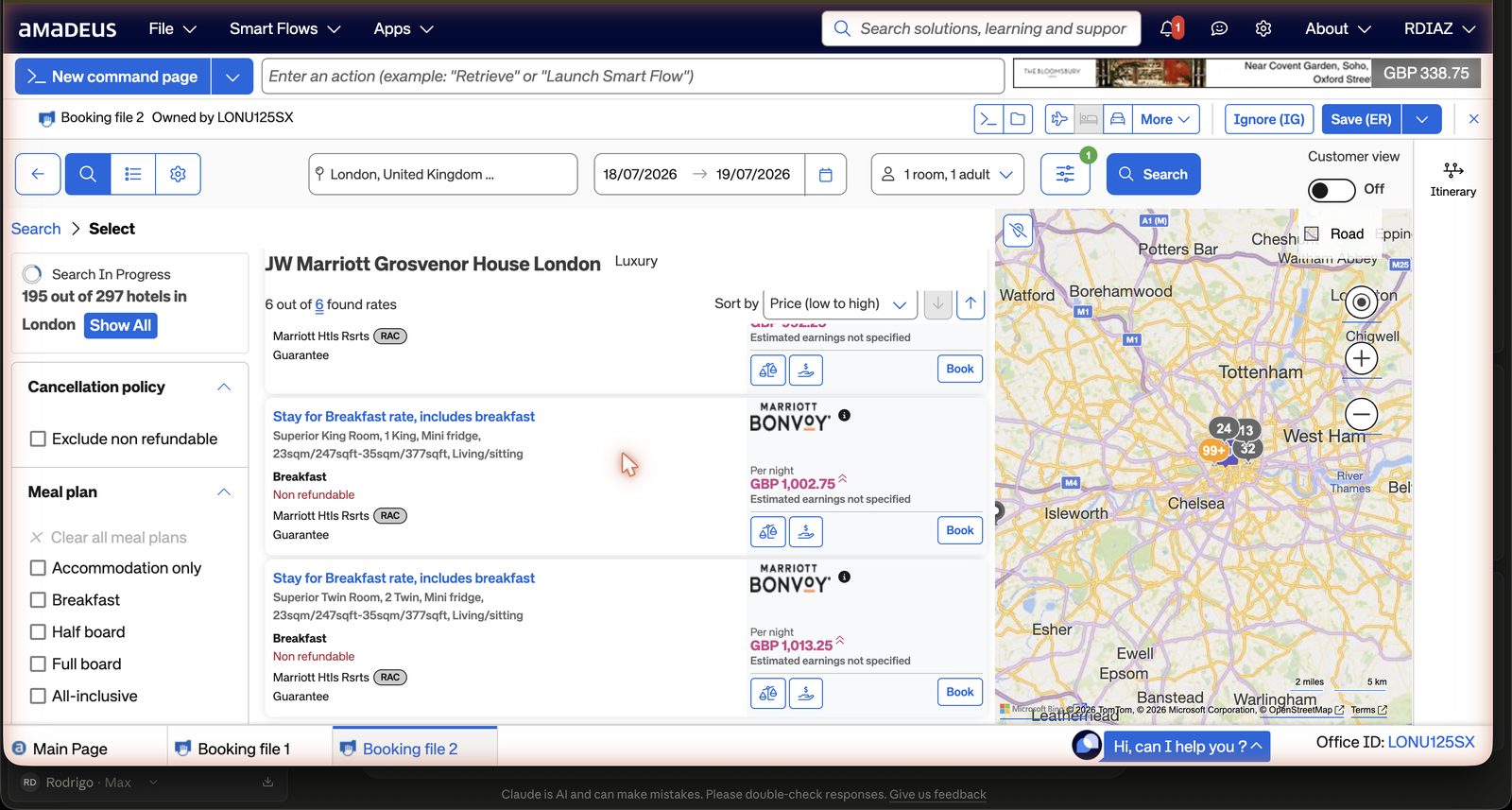
1 Live count: hotels stream in as sources answer · 2 Hotel cards: star rating, distance, lead price per night · 3 View rates opens the rate list, still completely safe · 4 The map mirrors the list, clusters are hotel counts · 5 Sort by distance or price. - Open the rate list, the moment of truth. View rates on a hotel card opens the full rate list for that property. Rates come back tagged with the access code and rate family they matched, so the negotiated lines will show the SR code you loaded rather than a generic public rate. For every rate you are considering, check four things before you go anywhere near the Book button: the rate description (what the breakfast or credit actually includes), the cancellation policy line, the guarantee or deposit line, and the commission indicator, shown on commissionable rates as "Est. earnings GBP x (10%)".
 1
2
3
4
5
6
1
2
3
4
5
6
1 Hotel header with 6 of 6 found rates · 2 Rate name and room: Stay for Breakfast, Superior King · 3 Refundability in red, read this line before anything else · 4 Source tag (RAC) and Guarantee note · 5 Per-night price; on commissionable rates the estimated earnings percentage shows here · 6 Book: THE dangerous click, it sells a real room, never press while exploring. - Sell the room. Select the rate and use Book. This adds a hotel segment (HHL) to the file. It will show either status HS (sold but unconfirmed) or, more often, directly HK (confirmed, with a confirmation number from the property). Enter the guarantee, the client's card, in the guarantee field only. Nowhere else.
- Finish the file. Add the received-from element (RF) if it is not already there, then save the file with the Save (ER) button. In the terminology you will see quoted around the office, this is "ending twice" or End and Retrieve (ER), which both saves the file and hands you back the confirmed record. Note the six-character record locator and the hotel's own confirmation number. Both numbers go into the Luminari hub booking entry, not just one of them.
- Retrieve, amend or cancel later. Find the file again by record locator or traveller name through the search magnifier. To cancel, remove the segment (XE followed by the element number in cryptic, or a bin icon on the segment in graphical mode) before the deadline shown in the policy line you screenshotted at the rate list step, then re-save the file to record the change. Whatever cancellation number the hotel gives you back goes into the client file alongside the original booking record.
04The three-channel search, and when commission matters
The doctrine
Every hotel request runs three searches in parallel, not one. Work through all three before a rate goes anywhere near a member.
- SPC, with the club's negotiated codes loaded from the table in section 3.
- Expedia TAAP, the agency channel where the club holds its own account: agency rates, commissionable, and an easy refundable filter.
- The hotel's own website, brand.com, checked for member and promotional rates.
The best offer for the member wins, full stop. For houses outside the Collection programmes, the club is competing on price and service alone, and sometimes that means earning nothing on the booking. For Collection houses, the club is competing on value: the negotiated rate, with breakfast, credits and upgrades attached, usually beats a bare discounted rate even when the nightly price looks similar, and it pays the club properly besides.
The sources toggle, the lesson that cost an hour
SPC's default hotel search quietly mixes two different kinds of channel. Aggregator lines, tagged "Amadeus Value Hotels", are prepaid, OTA-style and rarely negotiated. Chain lines are the ones that actually carry the club's codes. Left on the default, the two blend together and the negotiated rates can sit buried or simply fail to fire.
To see the club's codes work properly, open More search criteria and set Sources to GDS only. With that toggle set, hotels arrive through their own chains, The Savoy under the Accor flag, the Taj under IHCL, and the rates on screen carry your code tags rather than a generic aggregator listing.
Proven live: with the codes loaded and Sources set to GDS only, The Savoy returned a rate tagged (ABC), free cancellation, guarantee not prepaid, with roughly ten percent estimated earnings shown on the line.
Occupancy shapes the shelf
Enter children with their real ages, not just a headcount. Hotels price by age, and a family of four often forces the search into family-room inventory, where negotiated programmes thin out or disappear altogether. Couples, by contrast, tend to see the full negotiated shelf.
Commission, plainly
Commissionable rates, usually the flexible best available rate, pay around ten percent. That commission clears after checkout through Onyx CenterSource to the IATA on the booking, which is Simplexity's, and reaches the club through the host split. Promotional, member-only and deep prepaid rates are almost always non-commissionable, and entering the agency IATA against a brand.com booking changes nothing there. Expedia TAAP bookings, by contrast, are commissionable by design.
Rule of thumb: never trade the member's price for the club's commission. Book the best rate for the member, attach the IATA when the rate is commissionable, and bank the trust when it is not.
A real drill
| Channel | Rate | Terms |
|---|---|---|
| Member's own web rate | 301 GBP a night, all in | Cancellable to arrival day |
| Best GDS rate, same hotel | 377 GBP a night | Non-refundable |
Verdict: keep the web booking. The hotel sits in no club programme, so this is a price arena, not a value arena, and the web rate wins outright on both price and flexibility. The same drill run at The Savoy told the opposite story: the club's (ABC) agreement priced flexibly, with commission attached, which is the value arena at work.
05Cryptic command library
What began as a recognition card is now the fuller hotel-only reference, distilled from Amadeus's own quick guide. You still work in the graphical shell for real bookings; this is what to reach for when a Simplexity screenshot, a training note or the command line at the bottom of the SPC window shows you a cryptic hotel entry, and you want to read it properly rather than guess.
Search
The building blocks of a hotel availability line. Stack the qualifiers after the base search with a forward slash, in any combination.
| What you want | Command |
|---|---|
| Availability for n nights from a date | HA CTY DDMMM-n |
| Availability with an explicit check-out date | HA CTY 07DEC-10DEC |
| Occupancy, up to 9 | /RT-2 |
| Multiple rooms | /NR-2 |
| By hotel name | /HN- |
| By chain code | /CO- |
| By master chain code, spans a whole group's chains | HA EM LON 12SEP-2 (EM is Marriott's master code; find a group's own code with DNH MARRIOTT) |
| By the club's negotiated codes, up to eight at once | HA LON 12DEC-3/RT-2/SR-0S8-AB2-X15 (our own recipe from section 3) |
| Price cap | /QU- |
| Currency | /FC- |
| Hotel category, L = Luxury | /HC-L |
| Landmark search | /RP- |
| Flexible location search, by landmark, city or property name | /LOC- |
| Lowest-rate sweep | /LOW |
| Lowest-rate sweep, every status including closed | /LOW/ST-ALL |
| Associated airports or areas near a small city | /AR-ALL |
| Distance from the search point | /DI-10K |
| Search by address rather than city or hotel name | /AD-MAIN STREET |
| Search by postcode | /PH-12345 |
| Override the location when searching off an air segment | /LO-MAD |
| Fire-safety compliant hotels only | /SF-Y |
| Hotel list for a country or state, browsing rather than availability | HLXXAABB (AA country, BB optional state) |
Drilling into the display
Once a multi-property display is on screen, these move you into a single property, and back out again.
| What you want | Command |
|---|---|
| Open line 3's single-property display | HA3 |
| Live price and conditions for the rate at line 1 (Dynamic and Complete Access Plus chains only) | HP1 |
| Terms for the rate at line 2, including the cancellation policy | HT 2 |
| Rate-change check (an asterisk next to the status code means the rate changes partway through the stay) | HR |
| Hotel features | HF |
| Hotel features for any property, by chain and hotel code, no display needed first | HF XX PAR123 |
| Back to the multi-property display | MPHM |
| Back to the single-property display | MPHA |
Decode helpers
For the moment a code on screen means nothing to you.
| What you want | Command |
|---|---|
| Encode a chain name to its code | DNH TAJ |
| Decode a chain code | DNH HL |
| Decode a rate code | DNN WKD |
| Full list of hotel display codes | HE HTL CODES |
| Help pages, the last one chain by chain | HEHTL / GGHTL / GGHTLXX |
Access levels, and why they gate what you can see
The symbol sitting between the chain code and the hotel name on an availability display tells you which of these four you are looking at.
| Symbol | Access level | What it means |
|---|---|---|
| ! | Dynamic Access | The hotel's own reservation system, answering live. |
| + | Complete Access Plus | Instant confirmation, over a high-speed link to the chain. |
| / | Complete Access | Confirmation returned within four to eight seconds, before you even save. |
| (blank) | Standard Access | Teletype. The confirmation number arrives later, once the hotel updates the file. |
This is why HP only ever works on ! and + chains: it is a live call to the hotel's own system, and Standard or Complete Access hotels simply have nothing live to call. Use HT and HR on those instead.
After the sell, reference only, never a drill
- Change the check-in date on a sold segment:
5/DT-9MAY - Change the check-out date:
5/DD-29MAY - Cancel a confirmed segment, four steps in order:
RT1A2B3Cretrieve the file by its locatorXE3cancel the hotel segment, only after reading the cancellation policy in theRTSVCHdisplay (append the segment number, e.g. RTSVCH2)RF NAMEreceived-from, recording who asked for the cancellationETend transaction, committing the cancellation
Keep the line between the two firmly in mind. The desk drills with HA, HP, HT, HR and HF, and always exits with IG. HS, Save (ER) and TTP are never part of a drill: they sell a room, commit a card or ticket a flight, for real.
Guarantee and deposit, typed once, off the card ladder
The card itself never lives in SPC. It comes from the TravelJoy vault and is typed into one of these fields once, during a real sell, and nowhere else.
| What you want | Command |
|---|---|
| Guarantee by card, XX is the two-letter card code | /G-CCXX1234...EXP1299 |
| Deposit by card | /DP-CCXX1234...EXP1299 |
| Guarantee by booking source, agency IATA or TIDS, defaults to AAA if left bare | /G-BS |
| Deposit as an advance deposit | /DP-ADVDEP |
06The Luminari run-sheet
This is how a hotel request moves from a member's ask to a confirmed stay, tying SPC back into the club's own system.
- Request arrives in the hub pipeline.
- Availability check in SPC, using the programme codes from section 3c.
- Screenshot the two or three best rates, each with its benefit line and cancellation policy visible.
- Compose the proposal in the management hub from those screenshots.
- Member chooses a rate.
- Sell in SPC; guarantee with the member's card through the club's own card flow, never stored in SPC or anywhere else.
- Record locator and hotel confirmation number go into the hub booking entry.
- Arrival choreography follows: an arrival brief sent to the hotel, and a T-2 confirmation chase before the stay.
07Running the desk in the management hub
Everything above this section lives inside Amadeus. This section lives inside the other screen, the Luminari management hub at hub.luminariclub.com, and it is written so Marta can run the desk from it on her own, without needing to sit through any of the SPC training above. Sign in and everything described here is on-screen, under its own name in the left-hand menu.
The morning ritual
Open the hub at hub.luminariclub.com and start on Overview. The first thing on the page is the Desk today card, and it is the single queue for the whole desk. Every item on it is typed, Query, Quote or Chase, and carries a clock, either "due in" a number of hours or days, or "overdue" shown in red. Work down the list, but batch by type rather than taking items in whatever order they happen to sit: clear every query first, since Alfred will usually have already drafted a reply and the work is mostly reading it and pressing send; then sit down to the quotes together in one Amadeus sitting, since that is the moment worth staying in SPC for a run of searches rather than dipping in and out of it; then finish with the chases, which are generally a short nudge to a hotel or a member. Mark done closes a query once it is dealt with and drops it off the list. The small refresh arrow on the card's own heading pulls in anything new.
The funnel: Pipeline and Members
Pipeline is where every prospective member sits, from a first visit through to a travelling member, laid out as four stages: Started, Email verified, Awaiting decision and Active. However someone first reaches the club, a conversation with Alfred on the website, a straight application, or a friend's code, they surface as a name in this same pipeline. There is no separate inbox for Alfred's requests to check; they land here.
Applications awaiting your decision is the one card in Pipeline that wants a human choice. Each applicant carries Accept, Waitlist and Pass, plus View profile for the fuller picture first. Accept moves someone forward into Active membership and starts the welcome; Waitlist holds them without deciding either way; Pass closes the file. Needs a nudge, alongside it, lists anyone who started or verified an email address but never finished applying, so a name never simply goes quiet.
Members is the full list: a search box for a name, email or city, and filters for status (Active, Started (not verified), Email verified (no application), Awaiting decision, Waitlisted, Parted), how they joined (By invitation, By application), travel state (Travelling now, Trip upcoming, No trips) and a sort (Newest first, Oldest first, Name A to Z). The table carries Member, Location, Status, Type, Joined and Next trip. This is the page to open when you want everything about one household in a single place.
Building a proposal, the Proposals desk
A proposal is the club's own document, not a hotel's confirmation, and it should always read that way. Press + New proposal, or open a draft from the table (Member, Title, Trip, Options, Status, Valid until, Updated). Fill in the member's email and name, a title with its one-line dek underneath, the trip in a phrase, and the letter itself: a few lines in your own voice on what you looked at, what you ruled out, and why these made the cut. Add the honest numbers and the getting-there notes, one line at a time, and the terms.
Then add the options, two or three houses at most, the ones the club can genuinely stand behind, at the rates you actually held in that booking's Rate check panel (see Taking the booking, below), not a guess at what a room might cost. Keep to the voice throughout: never quote a price per night without giving the total alongside it, and always carry the cancellation line, since that is the one sentence a member will hold the club to later. Preview shows the proposal exactly as the member will receive it; Save keeps a draft without sending anything. Sending puts it in the member's inbox by mail, and it appears on the member's own home screen at the same moment, so there are two places to find it.
Taking the booking, the Bookings desk
Bookings carries a stay from first quote through to commission on the Booking board. Press + New booking to start a card, or Edit to open one already there. Every card has a Rate check panel: the three channels side by side, GDS with codes, Expedia TAAP and Direct brand.com, each with its price per night, total, refundability, meal plan, the code that actually fired, and whether it is commissionable; then a Winner, an Arena (value, where the Collection's benefits beat a bare price, or price, where the best number simply wins outside the programmes) and a Reason written in your own words.
The eight-point checklist, sitting under the rate check
- Occupancy entered with real children ages
- SPC searched with codes, Sources set to GDS only
- All three channels checked and logged above
- Cancellation lines read on the winning rate
- Member confirmed terms in writing (required if non refundable)
- Card ladder respected (vault to guarantee field only, nothing stored)
- IATA attached where the rate is commissionable
- Locator and confirmation number logged in this booking
Tick all eight and the counter on the panel turns champagne gold, 8 of 8, then press Save rate check. The actual selling still happens in Amadeus, following the steps already set out in sections 3 and 4 of this guide. Once the file is saved and you have the record locator back, use Paste PNR on the booking card to store it, and the board carries it from there: the same card now counts down Cancel by, T-2 chase and Arrival brief, and every other deadline that matters, so nobody has to remember a date by heart.
Money, the Finance desk
A booking's own status moves it from booked through commission expected to commission received as the stay runs its course, and Finance is where those figures are reviewed properly rather than left to memory: the Host split card against Simplexity, the Commission card for the period, and the Dissect panel below it, viewable this month, over 30 or 90 days, year to date, the last 12 months or all time, by day, week or month. Use it to check the club's own numbers against Simplexity's statements as they arrive, rather than trusting either side alone.
A closing note, for two people running a thousand
08What to ask Simplexity
Eight questions worth putting to Simplexity directly, ideally before or during the Monday call, rather than discovering the answers the hard way mid-booking.
- Which queues does the office use for hotel confirmations and schedule changes, and how often should I be clearing them. So a confirmed booking, or a hotel-initiated change, does not sit unseen.
- Are commissions tracked inside SPC itself, or reconciled separately, and by whom. Affects whether the hub needs its own commission ledger or can trust SPC's own record.
- Is the office profile for LONU125SX already set up with our rate codes as a standing company policy, or do we need to load all six manually on every search. If they can be preloaded, that removes a step and a source of error from every single search.
- Who at Simplexity is the right first call for a PCC or office-specific support issue, and what is the expected response time. Worth knowing before there is a live booking on fire, not during one.
- Is there anything specific to hotel sells, rather than flights, that the standard Amadeus training under-covers, given that hotels are the whole of the club's use of SPC for now. Lets the eventual training session be pointed at the gaps that actually matter to us.
- Whether their IATA is registered with Onyx CenterSource, and how commissions on web-originated bookings are reconciled back to the club. Confirms the commission the club expects from a brand.com booking is actually collectable, not assumed.
- Their split and policy on bookings made outside the GDS but attached to the house IATA. Sets expectations before the club routes web bookings through the same IATA as a matter of course.
- Which additional programme codes they could request on the club's behalf for the Collection houses not yet covered. Widens the negotiated shelf as the Collection grows, rather than leaving gaps to be found mid-search.